the most time consuming part. you gotta pick through and label every phoneme you've spoken in the audio you've recorded. for this, i personally use vlabeler. japanese is easy to label. to start, you're gonna wanna:
set up your folders:
set up the vlabeler project"
now you should be seeing your audio in vlabeler. the first thing you'll want to do is ensure that "show toolbox" is checked under the view tab in the top right corner. once that is checked, there will be tools you can select at the bottom left where the audio is shown. these tools are used for, in order from top to bottom:
in general though, i prefer to navigate using the scroll wheel. holding shift will allow you to scroll the audio freely, while using the scroll wheel alone will jump you through label by label. you can right click to play a section of audio, and hit the spacebar to stop playback. most of the time, the scissors tool will be selected. "pau" is the default phoneme name. it denotes a section where you are not singing. i also use it to ommit sounds that i do not want influencing the diffsinger later on. some examples include: coughing and throat clearing that i may have missed when combing through and removing parts i dont want earlier in the process, and the sound of me transitioning from nose breathing to mouth breathing when inhaling. to actually start, you want to:
for example, lets say the line you've sung is "ima kara bokura wa." you would label this as:
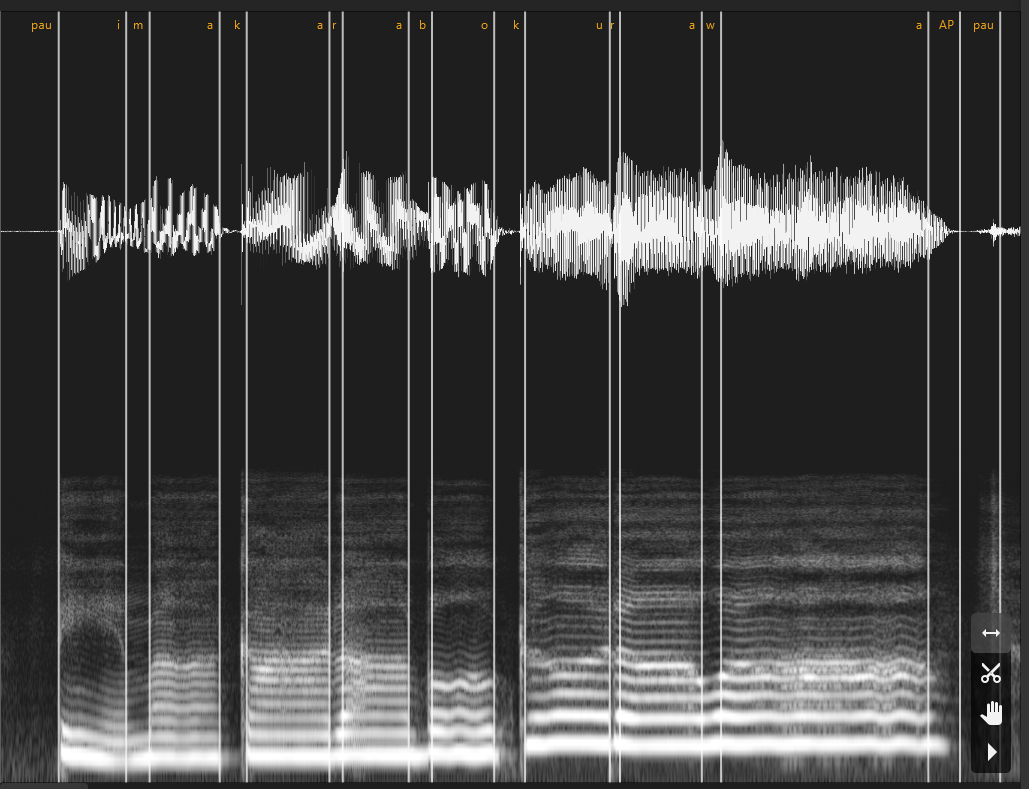
you want the transitional silence after the vowel and before the next consonant to be labeled as part of the consonant, unless it is followed by a pause. if you make it part of the vowel, the diffsinger will end notes prematurely. this was an issue with toriko 1.0 and 1.1. for consonants followed by the "i" sound, you will want to add a y. for example, for the word "kimi," you would label that as [ky][i][my][i]. however, not all of them are like this, the list of phonemes linked further into the paragraph lists them. for something like the syllable "kyu," you would label that as [ky][y][u]. some prefer to label it as [ky][u], but for me it caused issues with mispronunciation. you can see the mispronunciation issues with toriko 1.1 in particular. MaeBlythe talks about this in her blog post linked here. it's interesting and i highly recommend reading it. a list of phonemes can be found here. do remember that for diffsinger, breaths are "AP", silence is "SP" or "pau."
here is an annotated video of me labeling:
i don't like having to download things in order to view them either but i swear the video is helpful
some video notes:
*you don't have to label the breaths, but i highly recommend you do. it'll at least give the user a choice
**please look at the blog post and the phoneme list linked above
make sure that once you are done labeling, you check your work and export the labels. this can be done in the file tab or by pressing ctrl + alt + shift + E. now you're ready to train!